The Minnesota Star Tribune
- 4.3
- Rating
- 100.00K
- Installs
- Free
- Price

 Analysis by App-foxy
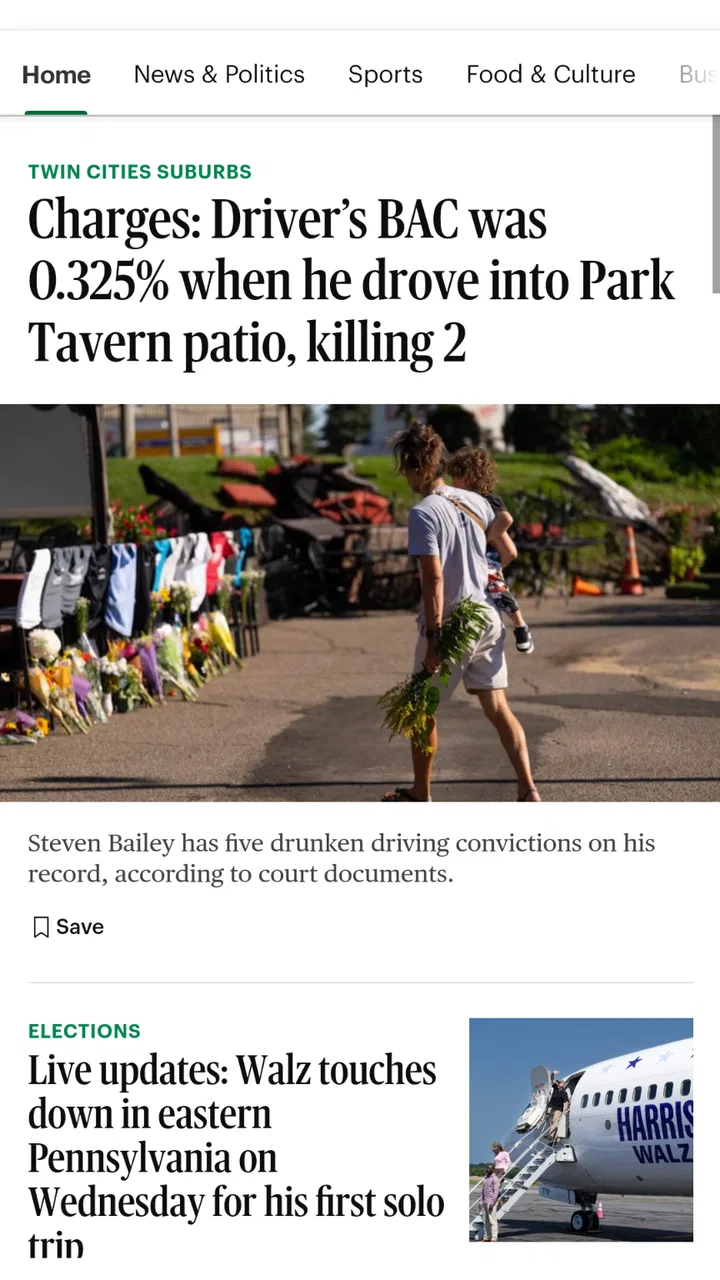
Keeping up with Minnesota news on a phone sounds simple until you try to do it during a busy morning, a commute, or a short break between errands. The Minnesota Star Tribune is built for that specific habit: opening a dedicated news app when I want local reporting in one place instead of sorting through a general-purpose feed. After spending time with it, I see it as a focused news and magazine app for readers who care about what is happening across Minnesota and want a newsroom-centered experience.
The app comes from Star Tribune Media Company, the organization behind the Minnesota Star Tribune. It is free to install, carries an Everyone 10+ content rating, and has been available since November 10, 2011. Its current version is 4.7, and it runs on Android 8.0 or later. Those details matter because this is not a brand-new experiment or a tiny side project; it is an established mobile route into a regional publication.
My overall impression is positive, but not unconditional. The strongest reason to use it is relevance: a Minnesota-focused newsroom can give local stories more attention than a national aggregator usually does. The main limitation is equally important: the experience depends heavily on connectivity, and the app makes the most sense for someone who already values this particular publication rather than someone looking for every possible source in one endlessly personalized stream.
You May Also Like

 Blood Strike: 2.5 Anniversary
Blood Strike’s Loadouts Turn Every Drop Into a Tactical Gamble
A close look at Blood Strike’s custom loadouts: how fast access to signature weapons reshapes its battle royale rhythm, rewards preparation, and narrows the gap between fights.

 Pandora - Music & Podcasts
Pandora’s Music Is Easy to Start, but Harder to Recover
Pandora’s strength is its low-effort path from a seed to a station. Its weak spot is how much confidence it asks you to place in connection, setup, and quiet recovery.

 8 Ball Pool
 Is Built on Rivalries, Rematches, and Routine
A close look at the rivalries, rematches, shared routines, and unanswered safety questions that turn a quick pool match into a persistent mobile community.

 Samsung Music
’s Quiet Strength Is Playing What You Already Own
Its reach comes less from spectacle than from dependable access to a personal library. That simplicity is both the app’s strongest retention engine and its ceiling.

 AccuWeather: Weather Radar
AccuWeather Review: A Quick, Clear Forecast for Everyday Decisions
For everyday plans, the best forecast is the one you can understand quickly. AccuWeather makes rain timing, radar, and local conditions easy to act on, with a few trade-offs.

 Hill Climb Racing
Why Hill Climb Racing Still Turns Crashes Into One More Run
A tiny car, a bumpy hill and one more upgrade: Hill Climb Racing keeps resurfacing because its simple chaos makes every near-miss feel personal.
More From Our News Desk



How the app feels when the news depends on a connection
The first thing I noticed is how closely the experience follows the rhythm of connected reading. I open the app when I have a reliable mobile or Wi-Fi signal, scan the latest headlines, and decide which stories deserve a longer look. That makes it useful at home, in a café, or during a work break, but it also means the quality of the session is tied to the network at that moment. A weak connection can turn a quick check into a wait, and that is more frustrating when I am trying to follow a developing local story.
This is different from reading a saved book or a downloaded podcast. News changes quickly, so the app’s value comes from reaching current material rather than simply displaying a fixed library. I treat it as a live window into the newsroom. When the connection is stable, that feels natural: I can move from a headline to the article, then return to the broader list and continue browsing. When connectivity is inconsistent, I become more selective and open only the stories I genuinely want to read.
That network dependence also shapes how I plan my reading. If I know I will be underground, traveling through areas with unreliable reception, or stepping away from data coverage, I do not assume the app will behave like a fully self-contained newspaper. I check important stories while connected and avoid making it my only source for information I may need immediately. That is not a criticism of local journalism; it is simply the practical trade-off of using a live news service on a phone.
For readers who want a constant stream of national headlines, the app may feel narrower than a large aggregator. I actually see that narrowness as a strength when my goal is Minnesota coverage. Instead of spending time teaching a recommendation system that I want local government, weather-related developments, neighborhoods, sports, and regional business news, I start with a publication whose identity is already local. The trade-off is less breadth outside Minnesota and a smaller reason to open it if local news is not part of my daily routine.
A practical morning routine
A realistic use case is a weekday morning before leaving home. I connect to Wi-Fi, open the app, and scan the main headlines rather than reading every article immediately. I look for anything that could affect my day: transportation developments, public decisions, severe weather coverage, or a major regional event. I then open one or two pieces that provide useful context. This works better for me than jumping between social posts, because the app gives the reading session a clear editorial starting point.
The same routine works during a short lunch break, but I change my expectations. I do not try to consume everything. I use the headline view as a filter, choose one substantial story, and leave the rest for later. That approach reduces the temptation to keep refreshing simply because new items may appear. It also helps with mobile data, since I am making deliberate choices instead of repeatedly loading pages without a clear purpose.
One useful habit is to distinguish between a quick update and a story that deserves uninterrupted attention. A phone is excellent for the first few minutes of awareness, but it is not always the best screen for a long investigation or a complicated explanation. If an article contains a lot of background, I prefer reading it when I am settled rather than trying to absorb it while walking or switching between tasks. The app makes discovery convenient; my own reading environment determines whether the journalism gets the attention it deserves.
Where mobile reading helps and where it gets in the way
The mobile format is especially helpful for people who want local awareness without carrying a printed newspaper. It fits naturally into small gaps in the day, and a dedicated app feels less cluttered than opening several browser tabs. I also like the psychological separation from social media. I am choosing a newsroom as my starting point rather than letting a mixture of friends, advertisers, and unrelated recommendations decide what appears first.
There are limits, though. A phone encourages skimming, and a headline-driven session can make serious reporting feel like another item in an endless list. I have to slow myself down deliberately. For important stories, I read beyond the opening lines, check the article’s full context, and avoid forming an opinion from the headline alone. That is a reading discipline rather than a missing feature, but it is worth mentioning because the app’s convenience can make shallow browsing very easy.
The app is also better suited to readers who know what they want from regional coverage. Someone who expects a highly customized feed covering international news, entertainment, technology, and niche interests may prefer a broad aggregator or a national newspaper app. In contrast, someone who wants a dependable Minnesota perspective may appreciate the reduced noise. I would not install this as my only news app if my interests were geographically broad, but I would consider it a strong specialist companion.
Before installing it, I would check device compatibility. The app requires Android 8.0 or later, which is reasonable for many current phones but still matters if you keep an older device for travel or as a backup. The age rating is Everyone 10+, so it is broadly approachable for families, although parents should remember that a general news publication can still discuss difficult real-world events. The rating does not turn the app into a children’s news product.
What happens when the connection fails
The most important practical question is what I should do when the network becomes unreliable. My answer is to treat the app as a connected reading tool and build a simple recovery routine. If a story stalls, I first avoid repeatedly tapping the same item. I return to the main screen, check whether other content loads, and try again after moving to a stronger signal. That prevents a temporary network issue from becoming a frustrating loop.
I also avoid relying on an untested connection during time-sensitive situations. If I am about to board a flight, enter a rural area, or lose access to Wi-Fi for several hours, I read the articles that matter before leaving. I do not assume that a page I have not opened will be available later. This is a small but valuable distinction: seeing a headline is not the same as having successfully loaded the complete article.
When the app recovers, I prefer to restart my reading from the main story list instead of trying to reconstruct everything from memory. That helps me notice whether the content has changed and prevents me from treating an old headline as the newest update. For breaking news, this matters more than speed alone. A connected newsroom app is most useful when I combine its updates with a habit of checking the current presentation after a disruption.
There is also a personal recovery step that improves the experience: I keep expectations realistic. A regional news app cannot eliminate dead zones, overloaded networks, or interruptions caused by the phone itself. If I need guaranteed access during a trip, I use another reading method as backup rather than blaming the app for a condition it cannot control. This is one of the clearest cases where a browser page, a saved article, or another already-available source may be more practical for a particular moment.
Using it without wasting mobile data
For data-conscious readers, the best workflow is intentional rather than passive. I open the app when I have a reason to read, scan first, and select articles instead of refreshing continuously. On Wi-Fi, I am more comfortable exploring several sections. On mobile data, I focus on the stories most relevant to me and close the session when I have learned what I needed. That habit is simple, but it makes a noticeable difference to how much value I get from each visit.
I also avoid treating every notification or headline as an instruction to read immediately. If the phone presents an alert, I decide whether it is genuinely urgent or merely interesting. Opening every item can create a cycle of loading, skimming, and abandoning articles halfway through. A better approach is to reserve mobile data for stories I will actually finish and wait for Wi-Fi when I want a longer browsing session.
Readers should pay attention to the commercial side as well. The app is free to install, but in-app purchases range from $0.99 to $259.99 per item. That does not automatically make it poor value, but it means I would review any purchase screen carefully before confirming anything. The free entry point is convenient for trying the app, while the possible purchase range makes it important to understand what a particular transaction provides and whether it matches my reading habits.
In my case, the value question is not simply whether the download costs money. It is whether the app saves me time by bringing meaningful Minnesota reporting into a routine I already have. If I open it several times a week and regularly read full articles, a publication-focused app can feel worthwhile. If I only want occasional headlines, a general news source may be enough and the dedicated app may not become part of my habits.
How it compares with browsers and general news feeds
The usual alternative is a mobile browser. A browser is more flexible: I can visit many publications, compare viewpoints, and search for a specific story without installing a dedicated app. That makes it better for research or for readers who do not want their news organized around one publisher. The Minnesota Star Tribune app is more convenient when I already know that this newsroom is where I want to begin.
A general news aggregator offers the opposite experience. It provides broader variety and often combines local, national, and international sources in one place. That is useful when I want a wide overview, but local stories may compete with louder national subjects. The dedicated app gives Minnesota coverage a clearer center of gravity. I would choose the aggregator for breadth and this app for a more concentrated regional reading session.
Social media is another common alternative, especially for breaking updates. It can be faster at surfacing eyewitness posts or public reactions, but it also requires more work to judge accuracy, context, and source quality. I prefer using a newsroom app for the reported story and social platforms, if at all, for discovering what people are discussing. Those two purposes are not interchangeable, and confusing them can lead to a very incomplete understanding of an event.
The app’s audience is therefore fairly clear. It suits Minnesota residents, former residents who want to stay connected, travelers preparing for a visit, and anyone with a serious interest in regional developments. It is less suitable for someone who wants a completely neutral collection of many publishers in a single feed, or for a reader who rarely follows local news. Knowing that before installing it prevents disappointment.
What the audience response suggests
The app has an average rating of 4.3 from around 1.3 thousand ratings, with 608 written reviews. I read that as a sign of generally favorable reception rather than proof that every reader will have the same experience. Ratings can tell me that the app works well enough for many people, but they cannot replace thinking about my own connection quality, reading habits, and expectations about local coverage.
It has also passed 100 thousand installs, which reinforces its role as an established regional news app rather than an obscure download. I still would not choose it solely because other people installed it. The meaningful question is whether I want a Minnesota newsroom at the center of my daily reading. If the answer is yes, the audience size and rating make trying it feel reasonable; if the answer is no, popularity will not solve the mismatch.
One subtle strength is that the app encourages a more deliberate relationship with a specific publication. Instead of chasing whatever happens to trend, I can make a habit of checking a regional source at a chosen time. That can improve my awareness of less flashy stories that matter locally. The weakness is that this structure may feel restrictive to people who enjoy algorithmic discovery and constant variety.
My connectivity verdict
After weighing the connected reading experience, I would recommend the Minnesota Star Tribune to anyone who wants a focused way to follow Minnesota news and is comfortable reading primarily when a stable network is available. Its free installation makes trying it straightforward, and its long presence on mobile gives it the feel of a mature publication app. I especially like it for short, purposeful sessions: checking the regional picture in the morning, reading one important article at lunch, or catching up after work.
I would skip it if I needed dependable access in places with poor reception, wanted one app covering the entire world, or preferred to compare several publishers every time I read a story. In those situations, a browser, a broader aggregator, or a source with a different reading workflow may serve me better. I would also be cautious about purchases and make sure I understand any charge before approving it.
My final view is that this app succeeds when I use it for what it is: a connected doorway into Minnesota-focused journalism, not an all-purpose replacement for every news source or every offline reading need. Its strongest feature is the editorial focus, while its main friction is the dependence on the network and the discipline required to read thoughtfully on a small screen. If local relevance matters more to you than endless variety, it is worth adding to your regular news routine.
For me, the best setup is simple: open it on a reliable connection, scan with a clear purpose, read the stories that genuinely matter, and keep another option available when reception is uncertain. Used that way, the app feels practical rather than overwhelming. It does not need to do everything to be useful; it needs to help me stay connected to Minnesota reporting, and that is where it earns its place.
FAQs for The Minnesota Star Tribune
01What is The Minnesota Star Tribune app?
The Minnesota Star Tribune app is the digital companion to Minnesota’s major daily newspaper. It provides access to local and regional reporting, national and international news, politics, business, sports, entertainment, opinion, and other features published by the Star Tribune. The app is designed for readers who want to follow Minnesota news conveniently from an Android or iOS device.
02Is The Minnesota Star Tribune app free to download and use?
The app can generally be downloaded without charge, but access to all articles and premium features may require a subscription or an active digital membership. Some stories may be available to non-subscribers, while frequent reading can lead to a paywall. Before downloading, check the current subscription terms, introductory offers, renewal conditions, and pricing shown in the relevant app store or on the official Star Tribune website.
03What type of content can I read in the Star Tribune app?
Readers can typically find breaking Minnesota news, local community coverage, investigative journalism, politics, business, sports, arts, food, travel, lifestyle stories, editorials, and opinion pieces. Coverage is especially focused on Minneapolis, St. Paul, and communities throughout Minnesota. The exact sections, featured stories, newsletters, multimedia content, and updates may change as the publication refreshes its digital experience.
04Can I read articles offline or receive breaking-news notifications?
The app may offer features such as notifications for important breaking stories, personalized news updates, and saved or downloaded content, depending on the current version and your device. Availability can vary between Android and iOS and may require permission in your phone’s settings. If offline reading is important to you, review the app’s latest feature list because not every article or section is necessarily available without an internet connection.
05What should I know about privacy, account access, and subscriptions?
Using the app may involve creating or signing in to a Star Tribune account, particularly for subscriber-only articles and personalized features. The service may collect information related to account management, app usage, device operation, subscriptions, and advertising, according to its privacy policy. If you subscribe through Google Play or the App Store, billing and cancellation are usually managed through that platform, so review renewal terms carefully before confirming payment.
Pros
- Concise local coverage makes it easy to stay informed about Minnesota.
- Breaking-news alerts can help readers follow important regional developments.
- The app offers convenient access to articles while traveling or commuting.
- Coverage includes politics
- business
- sports
- culture
- and community news.
- A trusted regional newsroom provides valuable local context and reporting.
Cons
- Some premium stories may require a paid subscription to read in full.
- Frequent notifications may feel excessive unless alert settings are adjusted.
- The app may use noticeable storage and data for images and multimedia.
- Coverage is highly Minnesota-focused and may feel limited for national news.
- Some features may depend on a stable internet connection.

The Minnesota Star Tribune
Gallery